
📅 Published: December 18, 2025
How to Design Effective Prompts for AI Tools
FREE DOWNLOAD
The 2026 AI Toolkit: 30 Free Tools to Start Earning Online
Get the exact tools 6-figure AI solopreneurs use - curated, ranked, and free to start.
No spam. Unsubscribe anytime. Sent to 4,200+ US solopreneurs.
Understanding AI Prompts
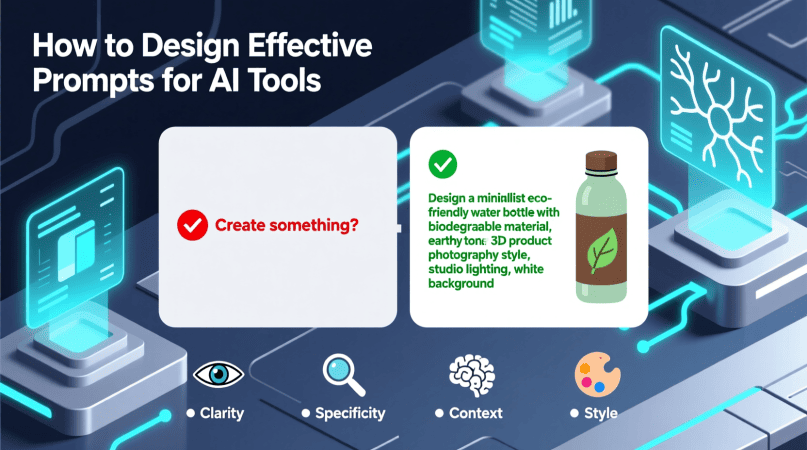
Before diving into the design of prompts, it’s crucial to understand what prompts are and their role in AI. A prompt is essentially a cue or instruction that guides the AI in generating responses. The effectiveness of an AI tool often hinges on the clarity and specificity of the prompt provided.
The Importance of Clear Instructions
Clear and concise prompts help the AI understand exactly what you are looking for. Vague or ambiguous prompts can lead to irrelevant or unsatisfactory responses. For instance, if you ask an AI, “Tell me about dogs,” you might receive a broad range of information. However, if you specify, “What are the key characteristics of Golden Retrievers?” the AI can provide much more targeted and useful information.
Designing Effective Prompts: A Step-by-Step Guide
Creating effective prompts can be broken down into several steps:
- Identify Your Goal: Before crafting your prompt, determine what you want to achieve. Is it information gathering, creative writing, or problem-solving?
- Be Specific: Use precise language that clearly outlines your request. The more specific your prompt, the more relevant the response.
- Incorporate Context: Providing context can help the AI understand the nuances of your request. For example, instead of asking, “Explain machine learning,” you could say, “Explain machine learning to a high school student interested in computer science.”
- Ask Follow-Up Questions: If the AI’s first answer isn’t quite right, don’t hesitate to ask follow-up questions to refine the output further. This iterative process can lead to better results.
- Review and Revise: After receiving a response, assess whether it meets your expectations. If not, refine your prompt and try again.
Checklist for Crafting AI Prompts
| Checklist Item | Description |
|---|---|
| Goal Clarity | Have you clearly defined the purpose of your prompt? |
| Specificity | Is your request specific enough to guide the AI? |
| Contextual Information | Have you provided enough context for the AI to understand? |
| Iterative Process | Are you prepared to ask follow-up questions? |
| Review | Will you assess the response to improve your prompts in the future? |
Examples of Effective Prompts
Let’s look at some examples to illustrate the principles discussed above:
Example 1: Information Gathering
Instead of asking, “What is climate change?” consider this prompt: “Can you summarize the primary causes and effects of climate change in simple terms suitable for a middle school science class?” This prompt is targeted, clear, and provides context for the level of detail required.
Example 2: Creative Writing
If you’re looking for a short story, instead of a generic request like, “Write a story about a dragon,” try, “Write a short story about a dragon who discovers a hidden talent for painting, set in a world where dragons are feared.”
Example 3: Problem-Solving
For troubleshooting, rather than simply stating, “My computer won’t start,” you could say, “My laptop won’t start after I updated the operating system. The screen remains black, and the power light is blinking. What steps can I take to diagnose the issue?” This detailed prompt helps the AI provide more relevant troubleshooting steps.
Common Pitfalls to Avoid
Even seasoned users can fall into traps when designing prompts. Here are some common pitfalls to watch out for:
- Being Too Vague: Avoid broad questions that can lead to ambiguous answers.
- Overloading the Prompt: Don’t crowd too many requests into one prompt. This can confuse the AI.
- Ignoring Context: Failing to provide context can result in irrelevant or unsatisfactory responses.
- Neglecting Iteration: Not following up on responses can lead you to miss out on refining the output.
Related Content
For a deeper understanding of prompts and the underlying AI models, check out our article on Understanding System Prompts and AI Tool Models. This resource will enrich your knowledge and enhance your prompt design skills.
Conclusion
Designing effective prompts for AI tools is a skill that can greatly improve your interactions with technology. By following the guidelines and examples outlined in this article, you can create prompts that yield valuable insights and creative outputs. Remember, practice makes perfect, so don’t hesitate to experiment with different styles and structures in your prompts. Happy prompting!
Continue Reading
Written by
George - Founder, Scalopa
George has been building AI-powered income systems since 2023. He tests AI tools hands-on and tracks real income data from 100+ US solopreneurs. All guides on Scalopa are based on direct testing or verified community data.